
Sim Racing · Room Guide
Sim Racing Room Setup Ideas: Wall Decor, Lighting & Layout

On this page
Short answer
A great sim racing room starts with enough space for the rig, controlled lighting and a wall that shows what you race. Plan roughly 80–200 cm of width and 150–300 cm of depth for a full cockpit, keep light sources off your screens, and use the wall behind your seat for a statement piece – a neon race track, an F1 car or your team logo – because that's what your stream and webcam see.
Whether you race in a spare room, a corner of the office or a converted garage, the room around your rig matters almost as much as the wheel and pedals. The right layout keeps you comfortable for long stints, the right lighting keeps your eyes on the apex, and the right wall decor turns a gaming corner into a proper race HQ.
How much space do you need for a sim rig?
Sim racing hardware maker Fanatec gives these rough guidelines for its setups:
| Setup | Width | Depth |
|---|---|---|
| Wheel on a desk mount | approx. 50–70 cm (20–28 in) | approx. 30–50 cm (12–20 in) |
| Full cockpit | approx. 80–200 cm (32–80 in) | approx. 150–300 cm |
| Cockpit with triple monitors | 200 cm+ with large screens | as cockpit |
Add space to get in and out of the seat – and remember that a shifter or handbrake mounted on one side makes it harder to enter from that side.
Sim racing room layout ideas
- Face the rig towards a wallScreens against a wall hide cables and keep light from windows behind you off the monitors. The wall behind you stays free for decor.
- Use the cornerIn a small room, a rig angled into a corner saves floor space and leaves two walls for wall art.
- Plan the entry sideKeep the side without a shifter or handbrake free, so you can get in and out easily.
- Protect the floorA rubber mat under the cockpit reduces vibration noise and protects wood or tiles.
- Manage the cablesRoute USB and power along the frame and to one power strip – fewer tripping hazards, cleaner photos.
- Mind the airflowPCs, direct drive wheels and long stints heat a small room fast. Keep a window or fan within reach.
Sim racing room lighting ideas
- Dim, not darkA softly lit room is easier on the eyes in long sessions than racing in total darkness.
- No light on the screensAvoid ceiling spots or windows that reflect in your monitors – glare costs you braking points.
- Indirect light behind the monitorsSoft light behind or above the screens adds depth and reduces eye strain.
- Decor lighting behind youA neon sign on the back wall sets the mood and looks great on camera, without glaring into your eyes.
- Match your coloursPick a neon colour that matches your team, livery or RGB setup – red, blue and ice blue are popular choices.
- Keep it switchablePut ambient lights on one switch or smart plug so you can go from “race mode” to “stream mode” in a second.
6 wall decor ideas for your sim racing room
Idea 01
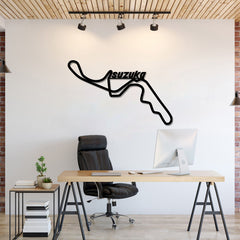
Put your home track behind the rig
The wall behind your seat is what your webcam and stream see. A glowing circuit there instantly says “racer” – pick the track you set your best lap on, or the one you dream of driving for real.


Idea 02
Build a “tracks I've raced” gallery
Hang three to five steel circuit maps in a row – one for every track you've mastered in the sim. Small 15.7" (40 cm) maps work for a tight wall, 27" (69 cm) for a bigger statement.


Idea 03
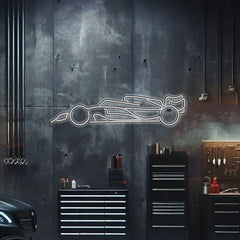
Hang an F1 car above the monitors
If you race open-wheelers, a Formula 1 silhouette above or beside your screens ties the whole room together – in matte steel or with LED neon.

Idea 04
Light up your sim racing team logo
Racing in a league or with your own team? Turn the team logo into a neon sign – it's the detail that makes your stream look professional.

Idea 05
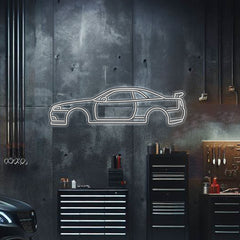
Show the car you race most
GT3 regular, JDM drifter or Porsche loyalist? Put your favourite sim car on the wall in neon so the room matches what you drive on screen.

Idea 06
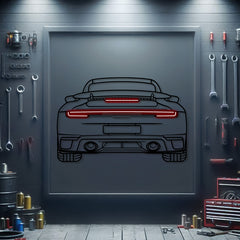
Add your real car to the virtual garage
The most personal piece in any sim room: your own car, made from a photo. It connects the real driveway with the virtual track.

Size guide: what fits on your sim room walls
| Spot | Suggested size | Best piece |
|---|---|---|
| Wall behind the seat (camera view) | 39–47" (99–120 cm) | Neon track or neon car |
| Above the monitor stand | 27–32" (69–80 cm) | Metal F1 car or car silhouette |
| Side wall gallery | 3 × 15.7" or 27" (40 / 69 cm) | Metal circuit maps |
| Large feature wall | 55" (140 cm)+ | Neon car or custom design |
Every piece is laser-cut steel and ships ready to hang with 1 cm wall spacers. For the full material comparison, see the guide on neon vs. metal.
Sim racing room checklist
- Measure the room: rig footprint + space to get in and out
- Rig faces a wall, screens away from windows
- Floor mat under the cockpit
- Cables bundled along the frame
- No lights reflecting on the monitors
- Soft indirect light behind the screens
- Statement piece on the wall behind the seat
- Power outlet planned for neon and lighting
- Fan or window for long sessions
- Webcam framing checked with the wall art in view
Build your race HQ.
Neon race tracks · F1 cars · Custom team logos · Free shipping worldwide
FAQ
How much space do you need for a sim racing setup?
It depends on the setup. According to Fanatec, a full cockpit needs roughly 80–200 cm (32–80 in) of width and 150–300 cm of depth, plus room to get in and out. A triple-monitor setup with large screens angled towards the driver can need more than 200 cm of width. A desk-mounted wheel only needs about 50–70 cm of width.
What is the best lighting for a sim racing room?
Keep the room dim but not dark, avoid light sources that reflect on your screens, and use soft indirect light behind or above the monitors. Decorative lighting such as a neon sign works best on the wall behind or beside the rig, where it adds atmosphere without glaring into your eyes.
Where should I hang a neon sign in a sim racing room?
On the wall behind your seat if you stream or use a webcam, because that is what your viewers see. Avoid placing a bright sign directly behind or next to your monitors, where it sits in your field of view and can distract you while racing.
What wall decor suits a sim racing or gaming room?
Race track maps, car silhouettes and neon signs are the most popular choices. Many sim racers hang the circuits they race most, a Formula 1 car or their favourite sim car – in steel for a clean look or with LED neon for a glowing streaming backdrop.
Can I get my sim racing team logo as a neon sign?
Yes. Modello Turbo makes personalized logo neon wall art from your design, available in several colours and sizes from 39" (99 cm).
What size wall art should I hang behind a sim rig?
For the wall behind the seat, 39–47" (99–120 cm) fills the camera frame well. Above a monitor stand, 27–32" (69–80 cm) usually fits. For a gallery of track maps, use three 15.7" (40 cm) or 27" (69 cm) pieces in a row.